P2

Outline

  • Simulating & Actuating Characters

    • Joint torques
  • PD (Proportional-Derivative) control

✅ 在仿真基础之上,如何驱动角色动画,如何动得更好,更真实。
✅(1)控制力如何施加到角色身上
✅(2)如何计算控制力

P4

Recap

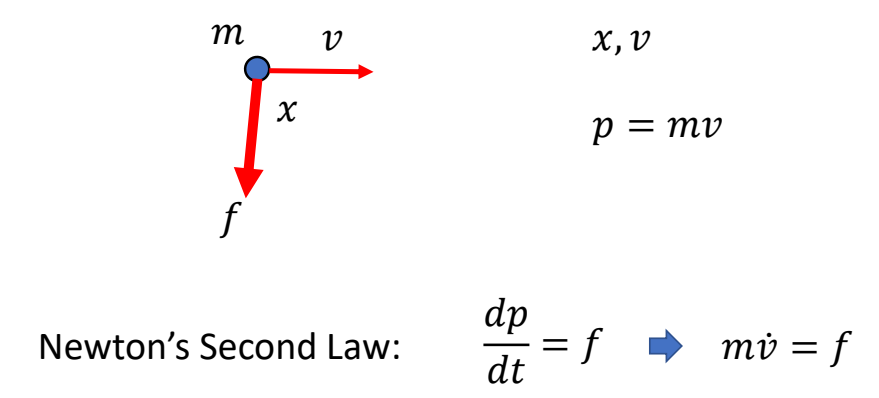
Dynamics of a Point Mass
P10

Rigid Body Dynamics
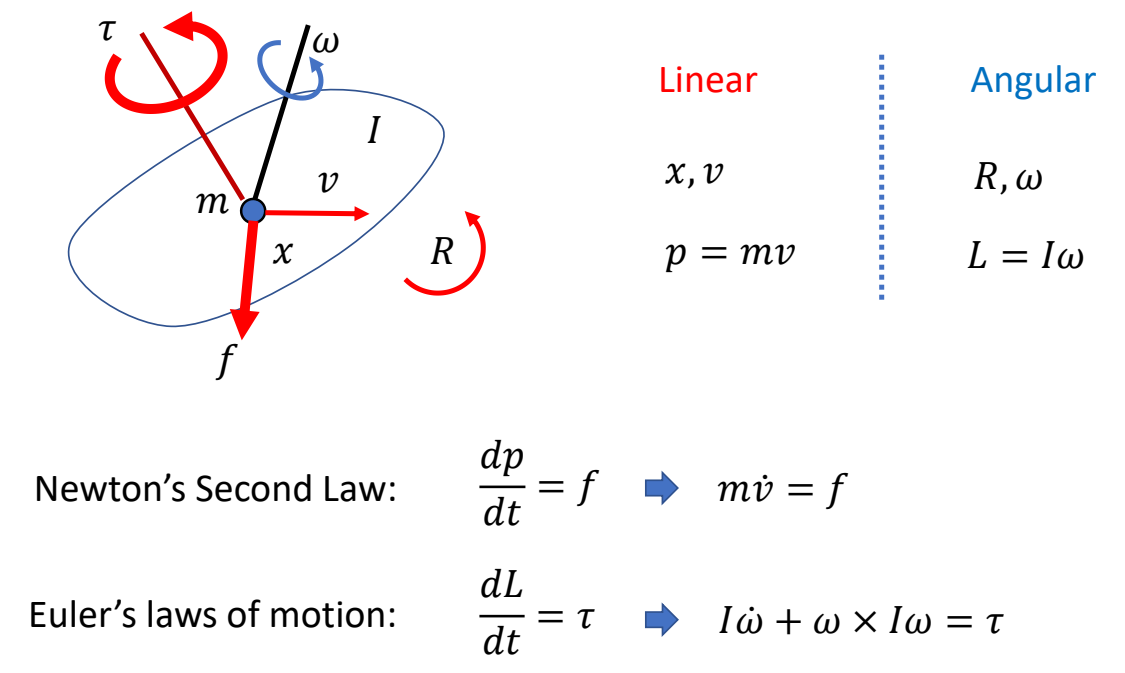
$$ \begin{bmatrix} mI_3 & 0\\ 0 & I \end{bmatrix}\begin{bmatrix} \dot{v} \\ \dot{\omega } \end{bmatrix}+\begin{bmatrix} 0\\ \omega \times I\omega \end{bmatrix}=\begin{bmatrix} f \\ \tau \end{bmatrix} $$

P12

Masses: \(m,I\)
Kinematics: \(x,v,R,\omega \)

Geometry:
• Box, Sphere, Capsule, Mesh, …
• Collision detection
• Compute \(m,I\)

✅ 在物理引擎里面定义一个刚体,需要提供这些参数。

P14

Dynamics of Articulated Rigid Bodies
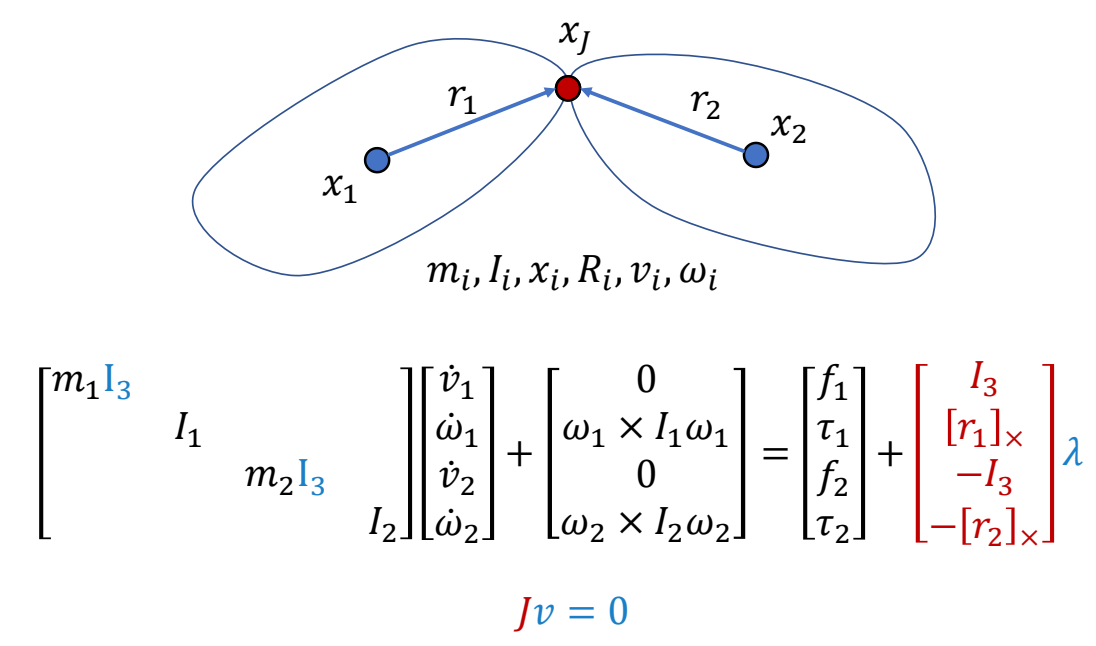
✅ 两个独立刚体,和一个不让它们断开的约束。

P15

$$ M\dot{v} +C(x,v) =f+J^T\lambda $$

P16

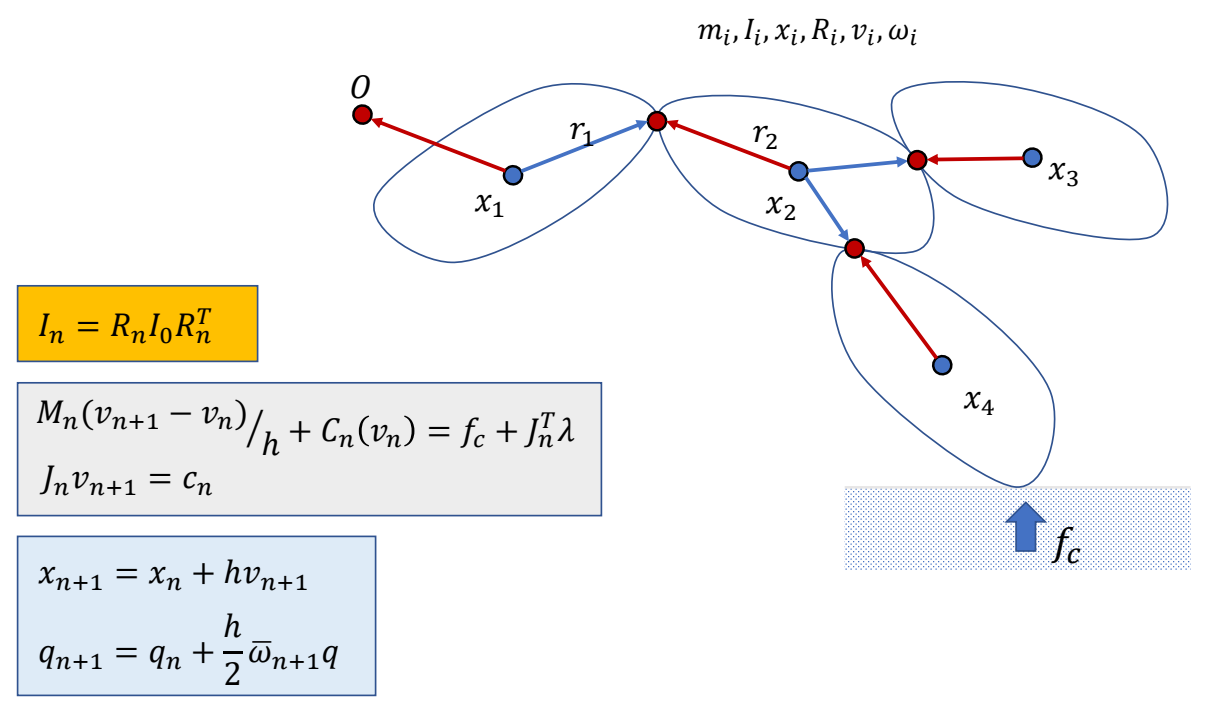
Simulation of a Rigid Body System
Simulating & Actuating Characters

P17

Defining a Simulated Character

Rigid bodies:

  • \(m_i,I_i,x_i,R_i\)
  • Geometries

Joints:

  • Position
  • Type

✅ Type指关节的类型,例如 Hint、Universal等。它决定了约束方程。

  • Bodies

✅ 关节的数量比刚体的数量少1

✅ 仿真过程中通常使用简单几何体代替 Mesh. 为了便于碰撞检测的计算,以及辨别里外。

P19

Simulating a Character Pipeline

✅ 这个仿真流程是 ragdoll 效果。

P22

Actuating a Rigid Body

✅ 想让角色做指定动作,不能直接修改其状态,而是控制力影响状态。

力加在质心上
✅ 在物体边缘旋加力,等价于在质心旋加力,并旋加一个导致旋转的力矩。
✅ 在质心上施加一个力矩,等价于施加一对大小相同方向相反的力。在质心处的合力为零,不会产生位移,只会产生旋转。
✅ 力矩只是数学上的概念。

P26

Actuating Articulated Rigid Bodies

✅ 为了驱动角色,可以单独对每个刚体施加力或力矩。
✅ 也可以在关节上施加力矩。

P29

Joint Torques

What is a joint torque?
How is a joint torque applied?

✅ 回顾前面公式,力和力矩都是施加在刚体上的,如何施加在关节上?

P33

什么是Joint Torques

✅ 关节上的力矩,可以看作是一个刚体对另一个刚体在关节处施加的成对的力,其合力为零,但可以转化为对另一刚体的力矩。

$$ \sum_{i}^{} f_i=0 $$

✅ 每个力都会对其中一个刚体的质心上产生力矩。

$$ \tau _1= \sum _ {i}^{} (r_1+r_i) \times f_i=r_1 \times \sum _ {i}^{}f_i + \sum _ {i}^{}r_i \times f_i $$

P34
由于

$$ \sum _ {i}^{} f_i=0 $$

得:

$$ \tau _1= \sum _ {i}^{} r_i \times f_i \quad \quad \quad \quad \tau _2= -\sum _ {i}^{} r_i \times f_i $$

✅ 另一个方向同理。
✅ 力矩跟关节的内置没有关系。

P36
结论:

✅ 在关节上施加力矩 \( \tau\) 等价于在一个刚体上施加 \( \tau\),在另一个刚体上施加 \(- \tau\).

P38

怎样施加Joint Torques

Applying a joint torque \( \tau\):

  • Add \( \tau\) to one attached body
  • Add \( -\tau\) to the other attached body

$$ M\begin{bmatrix} \dot{v}_1 \\ \dot{\omega }_1 \\ \dot{v}_2\\ \dot{\omega }_2 \end{bmatrix} + \begin{bmatrix} 0\\ \omega_1 \times I_1 \omega _1\\ 0\\ \omega_2 \times I_2 \omega _2 \end{bmatrix}=\begin{bmatrix} 0 \\ \tau \\ 0 \\ -\tau \end{bmatrix}+J^T\lambda $$

$$ Jv=0 $$

✅ 通常在子关节上加 \(\tau \),在父关节上加 \(-\tau \).

P40

Simulating + Controlling a Character

✅ 控制器,根据当前角色状态,以及额外控制信号实时计算出 \(f \) 和 \(\tau \),影响角色动作变化。

P44

Forward Dynamics vs. Inverse Dynamics

✅ 前向与后向,是一个运动方程的两种用法。
✅ 仿真器为前向部分,控制后逆向部分。

P46

Fully-Actuated vs. Underactuated

If #actuators ≥ #dofs, the system is fully-actuatedIf #actuators < #dofs, the system is underactuated
For any \([x,v,\dot{v} ]\), there exists an \(f\) that produces the motionFor many \([x,v,\dot{v} ]\) , there is no such \(f\) that produces the motion
✅ 可以精确控制机械臂到达目标状态。✅ 不借助外力情况,人无法控制 Hips 的状态(位置)。

✅ #actuators:\(f \) 和 \(\tau \) 的自由度。
✅ #dofs:角色状态的自由度。
✅ 避免让角色掉入无法控制的状态。

P49

Feedforward vs. Feedback

Feedforward controlFeedback control
\(f,\tau =\pi (t)\)\(f,\tau =\pi (s_t,t)\)
Apply predefined control signals without considering the current state of the systemAdjust control signals based on the current state of the system
Assuming unchanging system.Certain perturbations are expected.
Perturbations may lead to unpredicted results
✅ 如果角色受到挠动而偏离了原计划,无法修正回来。
The feedback signal will be used to improves the performance at the next state.

P55

Proportional-Derivative Control

✅ 有反馈,但还是算是前向控制,因为反馈的部分和想控制的部分不完全一致。

简化问题分析

问题描述

Compute force \(f\) to move the object to the target height

✅ 例子:物体只能沿竿上下移动,且受到重力。
✅ 控制目的:设计控制器,使物体在控制力的作用下达到目标高度。

使用比例控制

实际上:会产生上下振荡,不会停在目标位置。

P56

比例控制+Damping

✅ 改进:如果物体已有同方向速度,则力加得小一点。

P57

比例微分控制

✅ 第一项:比例控制;第二项:微分控制

P59

✅ 存在的问题:为了抵抗重力,一定会存在这样的误差。

P60

Increase stiffness \(k_p\) reduces the steady-state error, but can make the system too stiff and numerically unstable

✅ 增加 \(k_p\) 可以减小误差,但会让人看起来很僵硬。

P61

比例积分微分控制 Proportional-Integral-Derivative controller


✅ 解决误差方法:积分项。
✅ 但角色动画通常不用积分项。
✅ 积分项跟历史相关,会带来实现的麻烦和控制的不稳定。

P62

PD Control for Characters

✅ 前面是 PD 的例子,这里是 PD 在物理仿真角色上的应用,计算在每个关节上施加多少力矩。

✅ 通常目标的速度 \(\bar{q} = 0\).

因此:

P63

PD Control for Characters的参数和效果

✅ \(K_p\) 太小:可能无法达到目标状态。
✅ \(K_p\) 太大:人体很僵硬。
✅ \(k_d\) 太小:动作有明显振荡。
✅ \(k_d\) 太大,要花更多时间到达目标资态。

P66

Tracking Controllers

✅ 引入PD Control之后,控制本质上变成了设计 targer state.

P67

Full-body Tracking Controllers

✅ 设计角色的目标轨迹。
✅ 直接用 PD 控制跟踪动捕数据会有很大的问题,原因:
(1)稳态误差。
(2)运动轨迹跟原轨迹之间会相差一点点相位
(3)欠驱动系统,有一点点误差,后面无法修复。

P71

feedforward ? feedback

Is PD control a feedforward control?
a feedback control?

✅ 是反馈控制,因为计算 \(\tau \) 时使用了当前状态 \(q\).
✅ 是前馈控制,因为在 PD 系统里,状态是位置不是 \(q\).

P72

欠驱动系统

欠驱动系统的问题

由于是欠驱动系统,Tracking Mocap with Joint Torques会遇到问题,因为:

\(\tau _j\): joint torques
Apply \(\tau _j\) to “child” body
Apply \(-\tau _j\) to “parent” body
All forces/torques sum up to zero

✅ 合力为零,无法控制整体的位置和朝向。

P73

解决方法:增加净外力

\(f_0,\tau _0\): root force / torque
\(\quad\quad\)Apply \(f_0\) to the root body
\(\quad\quad\)Apply \(\tau _0\) to the root body
\(\quad\quad\)Non-zero net force/torque on the character!

✅ 净外力,无施力者,用于帮助角色保持平衡。
✅ 缺点:让角色看起来像提线木偶。

P75

Mixture Simulation and Mocap

✅ 关键帧与仿真的混合。


本文出自CaterpillarStudyGroup,转载请注明出处。

https://caterpillarstudygroup.github.io/GAMES105_mdbook/